
SqrMe - Square Photo Editor1.2.3 - Google Play
You'll be able to see results in few seconds.
Publisher Description
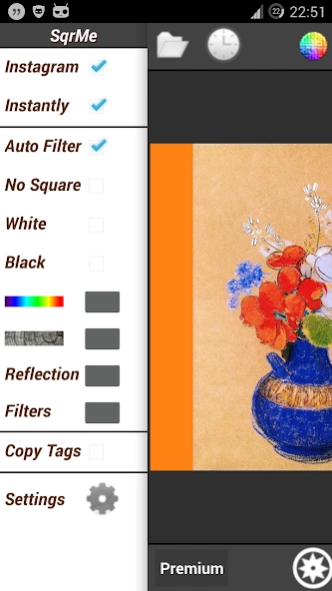
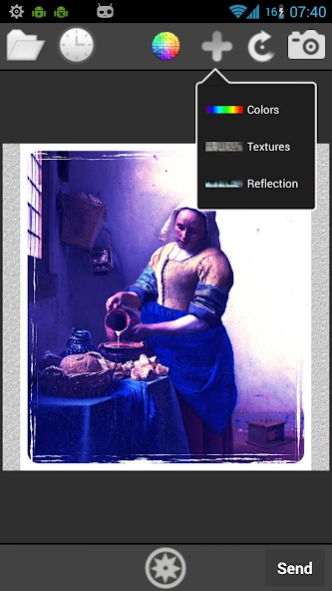
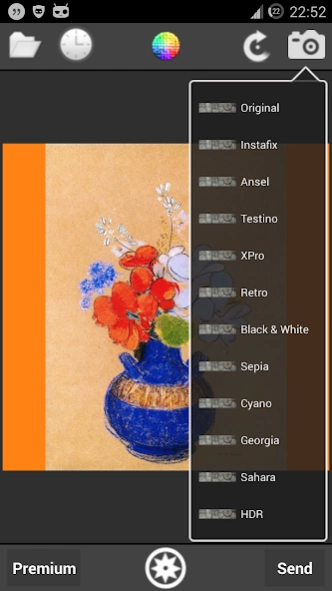
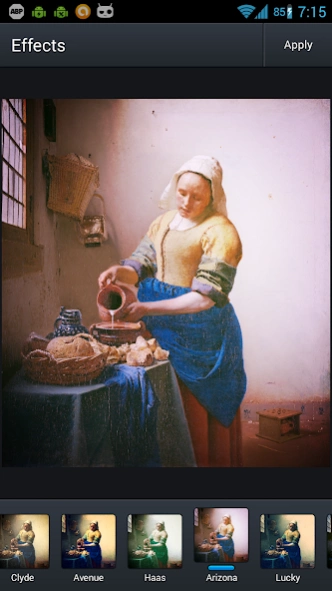
Filter, square with no crop, share full size photos automatically! Time saving !
SqrMe is the fastest way to automatically filter, square and share your photos instantly with no cropping, automatically, only ONE step :
1) Choose SqrMe app for sharing a photo (from gallery, web page, camera ...) and it will automatically make the magic...
Main features:
★ Automatically Square shaped pics with no crop, filter images, photos, pictures
★ Instantly share on popular social networks
★ Take a photo, it will be automatically squared and filtered
★ Square and enhance images from other applications
★ Camera mode to instantly take a shot and automatically square your photo at start up
★ Add blur effect on background frame
★ Set any image as background !
★ 400 background textures (wood, water, glass, brick, roof, sky ...)
★ Many background colors with color chart
★ Add any picture in background folder to load automatically for your backgrounds
★ Rotate/flip or enhance with filters
★ Choose image position
★ Add a reflection effect
★ Apply filters : quick preselected filters or aviary complete features
★ Even a "No Square option"
★ Auto filter : apply default filter automatically
★ Auto color : set the dominant color of your picture as background automatically
★ Auto Blur frame
★ Save available Exif data
★ Save image (long click)
★ Sliding panel for quick access
★ Hashtags : 28 most popular tags for your followers or any texts ready to use !
★ Set a delay to copy Tags : SqrMe will copy them for you automatically after a delay
Have a great time with SqrMe !
About SqrMe - Square Photo Editor
The company that develops SqrMe - Square Photo Editor is ErgSap Vision. The latest version released by its developer is 1.2.3.
To install SqrMe - Square Photo Editor on your Android device, just click the green Continue To App button above to start the installation process. The app is listed on our website since 2015-03-23 and was downloaded 0 times. We have already checked if the download link is safe, however for your own protection we recommend that you scan the downloaded app with your antivirus. Your antivirus may detect the SqrMe - Square Photo Editor as malware if the download link to com.ergsap.sqrme is broken.
How to install SqrMe - Square Photo Editor on your Android device:
- Click on the Continue To App button on our website. This will redirect you to Google Play.
- Once the SqrMe - Square Photo Editor is shown in the Google Play listing of your Android device, you can start its download and installation. Tap on the Install button located below the search bar and to the right of the app icon.
- A pop-up window with the permissions required by SqrMe - Square Photo Editor will be shown. Click on Accept to continue the process.
- SqrMe - Square Photo Editor will be downloaded onto your device, displaying a progress. Once the download completes, the installation will start and you'll get a notification after the installation is finished.
Program Details
System requirements
Download information
Pricing
Version History
version 1.2.3
posted on 2015-03-23
★ instant Camera (magic)
★ blur & auto blur as background picture + instant sharing
★ auto color
V1.1
- bug fixes
★ Move image position
★ Set any image as background!
★ Quick filters
★ Auto filters : apply an effect automatically
★ Explore popular images from Flickr or 500px collections
★ Camera mode
★ Performance, design & photo quality improvements
V1.0
-400 background textures !
-reflection
-Save image
-"No Square option"
-most popular tags
-set a delay to copy tags
-Exif data
version
posted on 2015-03-23
★ instant Camera (magic),★ blur & auto blur as background picture + instant sharing,★ auto color,V1.1,- bug fixes,★ Move image position,★ Set any image as background!,★ Quick filters,★ Auto filters : apply an effect automatically,★ Explore popular images from Flickr or 500px collections,★ Camera mode,★ Performance, design & photo quality improvements,V1.0,-400 background textures !,-reflection,-Save image,-"No Square option",-most popular tags,-set a delay to copy tags,-Exif data
Disclaimer
Official Google Play Link
We do not host SqrMe - Square Photo Editor on our servers. We did not scan it for viruses, adware, spyware or other type of malware. This app is hosted by Google and passed their terms and conditions to be listed there. We recommend caution when installing it.
The Google Play link for SqrMe - Square Photo Editor is provided to you by apps112.com without any warranties, representations or guarantees of any kind, so access it at your own risk.
If you have questions regarding this particular app contact the publisher directly. For questions about the functionalities of apps112.com contact us.
